1. In the left navigation panel, go to Inventory and select Manage Pars.
2. The Par Manager page will open at this time. This tool allows you to set the Par field listed within all item details from one convenient page. Enter the desired Par level in the Par fields on this page and if will save to the items after entry.
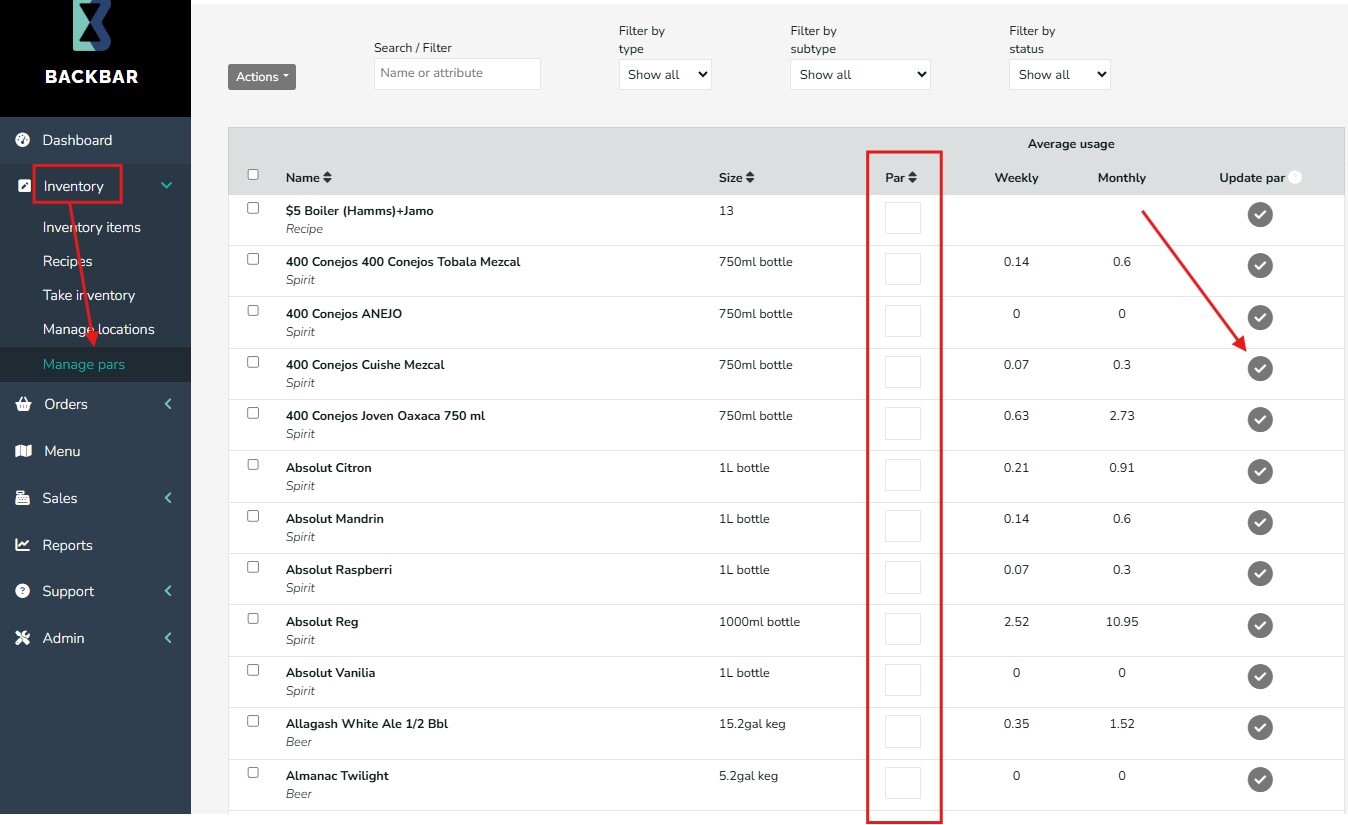
You can also click the Check circle on the right side of any item to set your par to the monthly usage, rounded up to the next whole unit. Only the monthly usage is considered when using this feature to pick the par level for the item.
The Weekly and Monthly totals are calculated based on an an items usage calculation in Backbar. This calculation is determined from the Usage details equation based on the last two inventory sessions. The Usage formula is:
Beginning Inventory + Orders/Adjustments - Ending Inventory
You can also view the weekly usage for any item by clicking on the item history (notepad icon) on the right of any item in inventory. Weekly usage is listed in the header.
The tool has a number of search and filter fields at the top, that allows for the selection of items to be pared down or for you to jump to an item quickly. You can also set all Monthly par levels from the Actions menu at the top. Display more items per page by expanding the range at the bottom of the table.